
Dec 25, 2025 10 min read
How to Build a Prompt Library in 2026: From Zero to Organized
Build a prompt library that scales. Complete guide to organizing, templating, and maintaining your AI prompts. Includes templates and 30-day plan.
Read Article
Keep client prompts organized, separated, and reusable. Stop losing working versions in Docs and stop your team from rewriting the same prompts every week.
Built for agencies managing repeatable AI workflows across multiple clients.
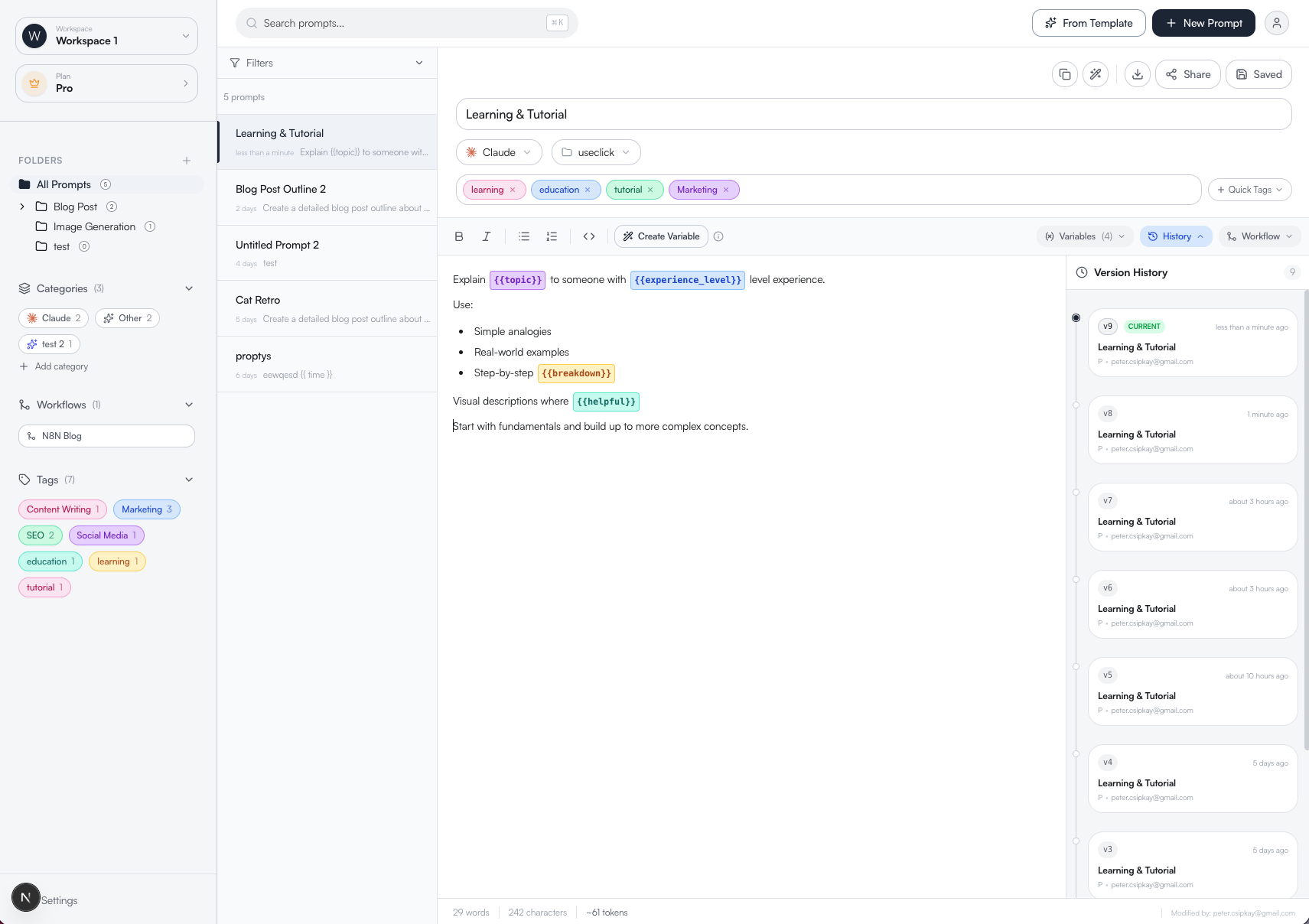
ManagePrompts helps agencies and teams keep AI prompts separated, reusable, and version-controlled across clients and workflows.
Docs and Notion are fine until your team starts reusing prompts across clients, editing working versions, and duplicating the same setup again and again. ManagePrompts gives you a structured library built for repeatable AI work.
 ChatGPT12
 Claude8
 Midjourney5
 Perplexity4
 Google3
Build once. Reuse across clients, campaigns, or tasks with variables your team can fill in fast.
Works with prompts for ChatGPT, Claude, Gemini, Midjourney, and any text-based AI workflow.
Create dedicated workspaces for each client or internal project. Keep approved prompts in one place, give your team the right access, and stop mixing experiments with production-ready versions.
Get StartedKnow what changed, who changed it, and restore the winning version instantly when outputs start slipping.
Google Docs and Notion can store prompts, but they do not give you version history, reusable variables, client separation, or clean team handoff. ManagePrompts is built for prompt operations, not just prompt storage.
When automations break, the problem is often the prompt. Keep the prompts behind your n8n, Make, or Zapier workflows documented, versioned, and reusable.
Send a clean link to teammates or clients. Keep everyone on the latest approved version without extra copy-paste or duplicate files.
When outputs drop, you need to know what changed. Compare versions side by side, restore working versions instantly, and keep a full history of edits across your team.
Added step-by-step reasoning system
Refined persona definition
Initial prompt structure created
Explain {{topic}} to someone with {{experience_level}} level experience.
Use:
• Simple analogies
• Real-world examples
• Step-by-step {{breakdown}}
Visual descriptions where {{helpful}}.
Start with fundamentals and build up to more complex concepts...
Build once. Reuse across clients, campaigns, or tasks. Add fields like {{client_name}}, {{topic}}, or {{offer}} so your team can generate consistent outputs without rewriting the same prompt every time.
Turn repeated prompt work into a reusable operating asset.
Make it clear what needs to change and what should stay approved.
Keep output quality steady without rewriting from scratch.
Create dedicated workspaces for each client or internal project. Keep approved prompts in one place, give your team the right access, and stop mixing experiments with production-ready versions.

Explain Quantum Computing to someone with High School level experience.
Use simple analogies
Real-world examples
Send a clean link to teammates or clients. Keep everyone on the latest approved version without extra copy-paste or duplicate files.
Build a prompt library that scales. Complete guide to organizing, templating, and maintaining your AI prompts. Includes templates and 30-day plan.

Never lose a winning prompt again. Learn how to track changes, compare versions, and rollback instantly. Complete guide to AI prompt version control.

Learn how to build a team prompt library that actually works. Stop losing prompts in Google Docs. Organize, version, and share your AI prompts effectively.
“We manage 8 client prompt libraries. Before this, our team duplicated prompts across Notion pages. Now every client has its own workspace and we can roll back bad edits in seconds.”
“Our content team reused the same core prompts across campaigns, but Docs made approvals messy. Templates and version history gave us one approved source of truth.”
“When an automation started producing worse output, we traced it back to a prompt change immediately. That alone justified moving out of Docs.”
Choose the setup that matches how you manage AI work: solo, team, or multi-client agency.
For individuals getting started
For operators and freelancers
For small teams (up to 5 members)
For agencies (up to 10 members)
Set up your first workspace, import your best prompts, and give your team one source of truth.
No credit card required. Set up your first client workspace in minutes.